
ostudy

Notes

Notebooks for everything you study

Write by hand, type, draw and paste pictures on pages of paper, or map out a topic on an endless board, with the same tools you use to mark up a PDF. Every note can link back to the page it came from, the study guide it belongs with, or a deck you can practice in one tap.
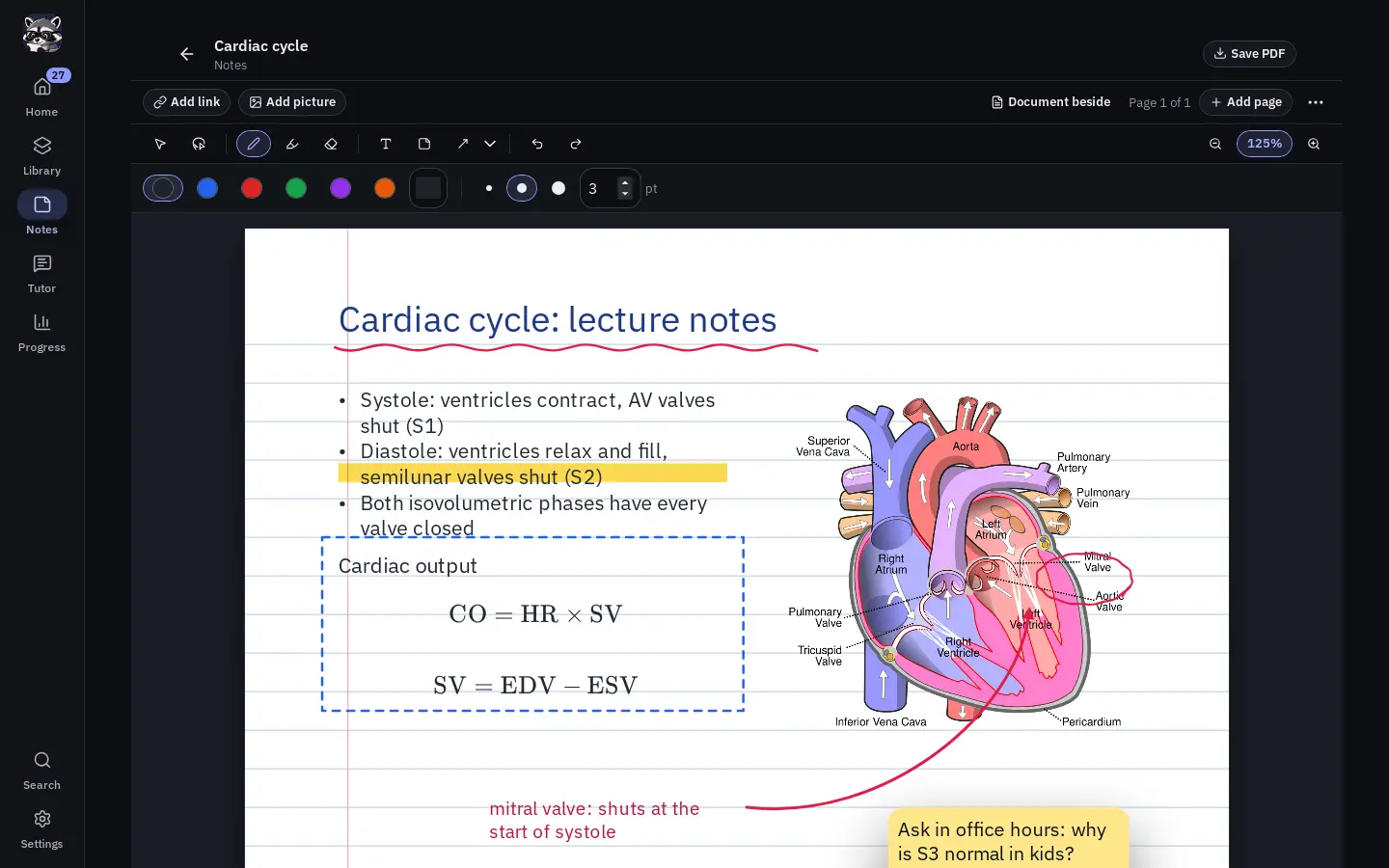
A notebook open on a computer: lecture notes on the cardiac cycle with a handwritten underline, bullet points, a highlight, a boxed formula, a heart diagram with a circled valve, an arrow to a note and a sticky note, and the toolbar above
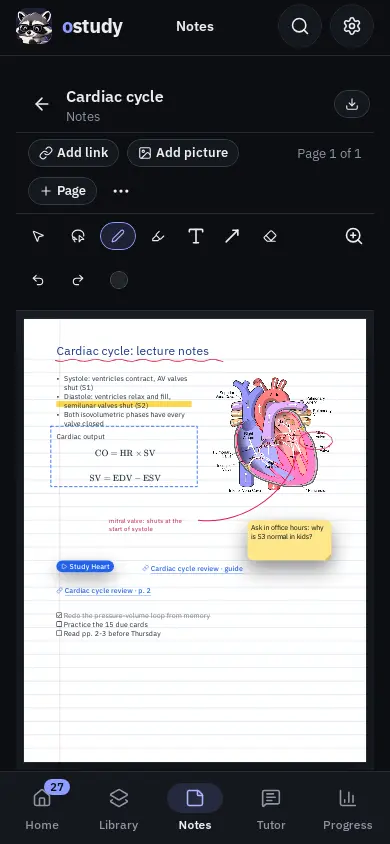
The same notebook page on a phone, with links to a deck, a study guide and a document page, and a checklist
A notebook on a computer, and the whole page on a phone with its links and a checklist. Heart diagram by Wapcaplet, Wikimedia Commons, CC BY-SA 3.0.

Write and draw

Full featured note taking application

Pick blank, lined, grid or dotted paper in Letter, A4 or a wide landscape page with room for diagrams and mind maps. Then write the way you would in a paper notebook.

  • Pen that gets thicker when you press harder with a stylus, and a highlighter that keeps what's under it readable.
  • Text notes with bullet and numbered lists, checklists and formulas such as CO = HR × SV.
  • Sticky notes, and lines, arrows, curves, boxes and ellipses in any colour.
  • Select and lasso to move, group and resize marks, and an eraser that can take away part of a stroke.
Tablets and phones

A stylus writes, fingers scroll

On an Android tablet the stylus draws while your fingers scroll and zoom, and a resting palm is ignored. On a phone a finger draws with every tool.

Saved as you write

Every mark is kept in your library the moment you make it. Add, reorder and delete pages as the notebook grows.

Mind maps and boards Next release

Create mind map diagrams

A board is a notebook page with no edges. Pan and zoom from a bird's-eye view down to the details, hold Space to drag the page, and use Fit all or the corner overview to find your way back. Everything else in Notes works on it too: the pen, shapes, pictures, sticky notes and links.

Choose the mind map tool and start typing. Each topic grows branches with the keyboard, and the map lays itself out tidily as you go. Write beside it with the pen, circle a topic, or add a sticky note: a map is part of the page, not a separate kind of document.
  • Tab adds a branch under a topic and Enter adds one beside it; the arrow keys move around the map.
  • Three layouts: branches on both sides, all to the right, or a tree that grows down.
  • Fold a branch to hide its details until you need them.
  • Coloured branches, and links on any topic to a document page, a study guide or a deck.
  • Save as PDF, with each board on one page or split over Letter or A4 pages.
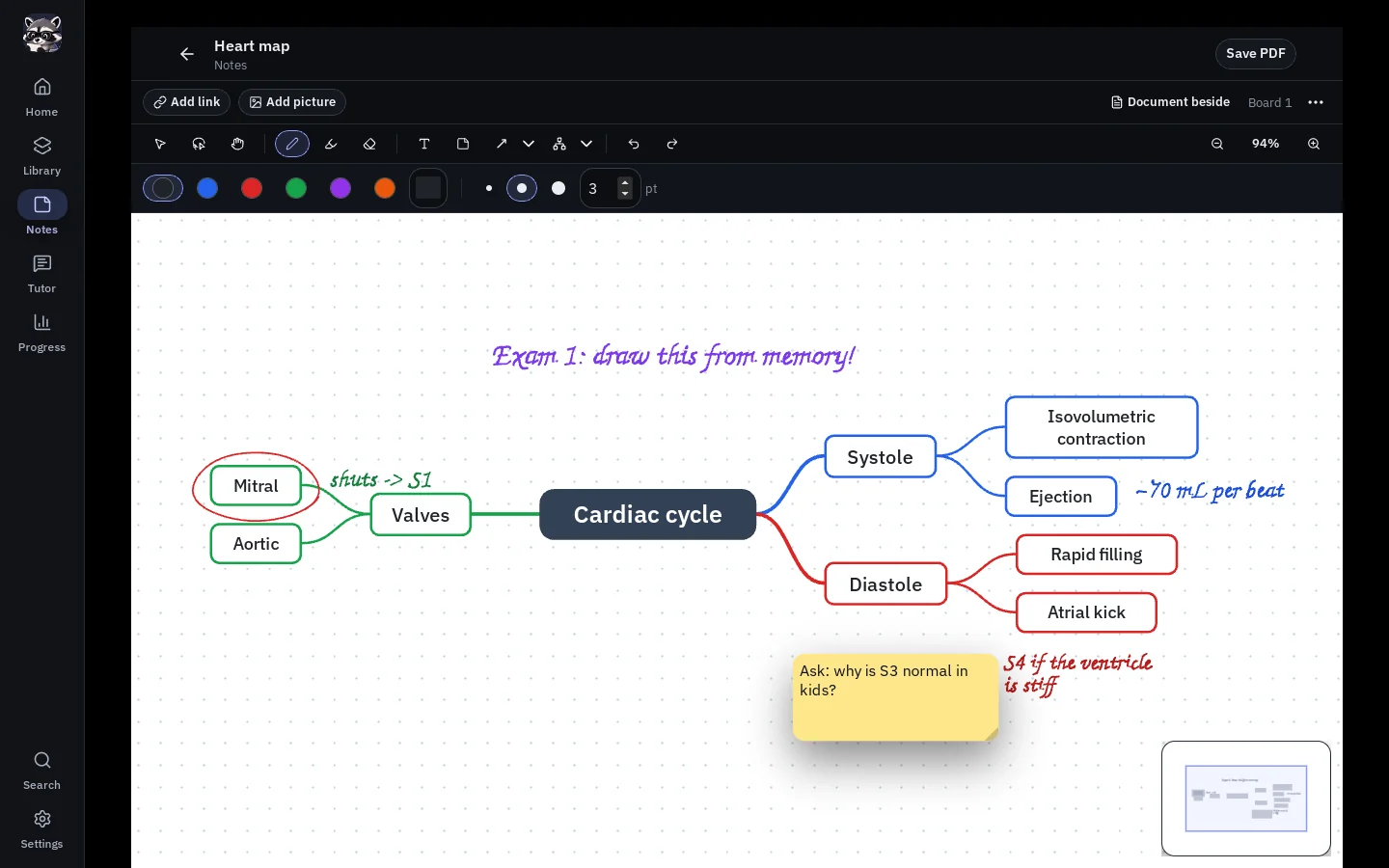
A mind map on a board: Cardiac cycle in the middle with Valves, Systole and Diastole branching out in their own colours, a handwritten heading saying Exam 1: draw this from memory, a red circle drawn around Mitral, handwritten notes beside Mitral, Ejection and Atrial kick, a sticky note, and the board overview in the corner
A mind map with branches on both sides, with notes written beside it with the pen and a sticky note.
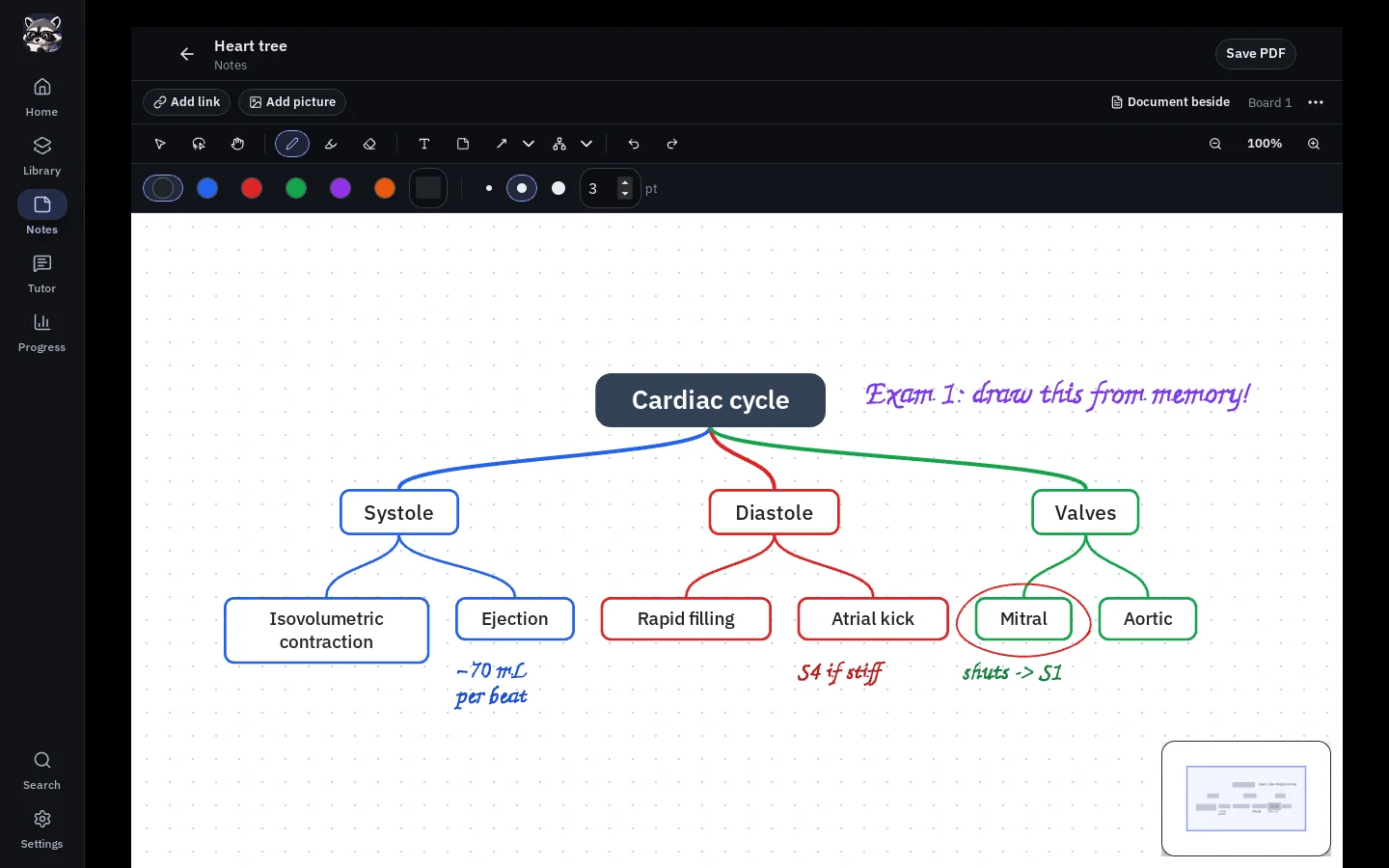
The same mind map laid out as a tree growing down from Cardiac cycle, with handwritten notes under Ejection, Atrial kick and a circled Mitral
The same map as a tree that grows down, with handwriting beside the topics.

Boards and mind maps are finished and in testing. They arrive in the next release of ostudy; these screenshots come from that build.

Links

Integrate your notes with other study materials and documents

Add a link to a page of a PDF in your library, a study guide, a deck or another page of notes. Show it as underlined words or as a button. A document link opens that page with every marking tool, and a deck's button starts practice on its cards right away.

Clip part of a PDF page into your notes and the picture remembers where it came from, so one tap takes you back to the page.
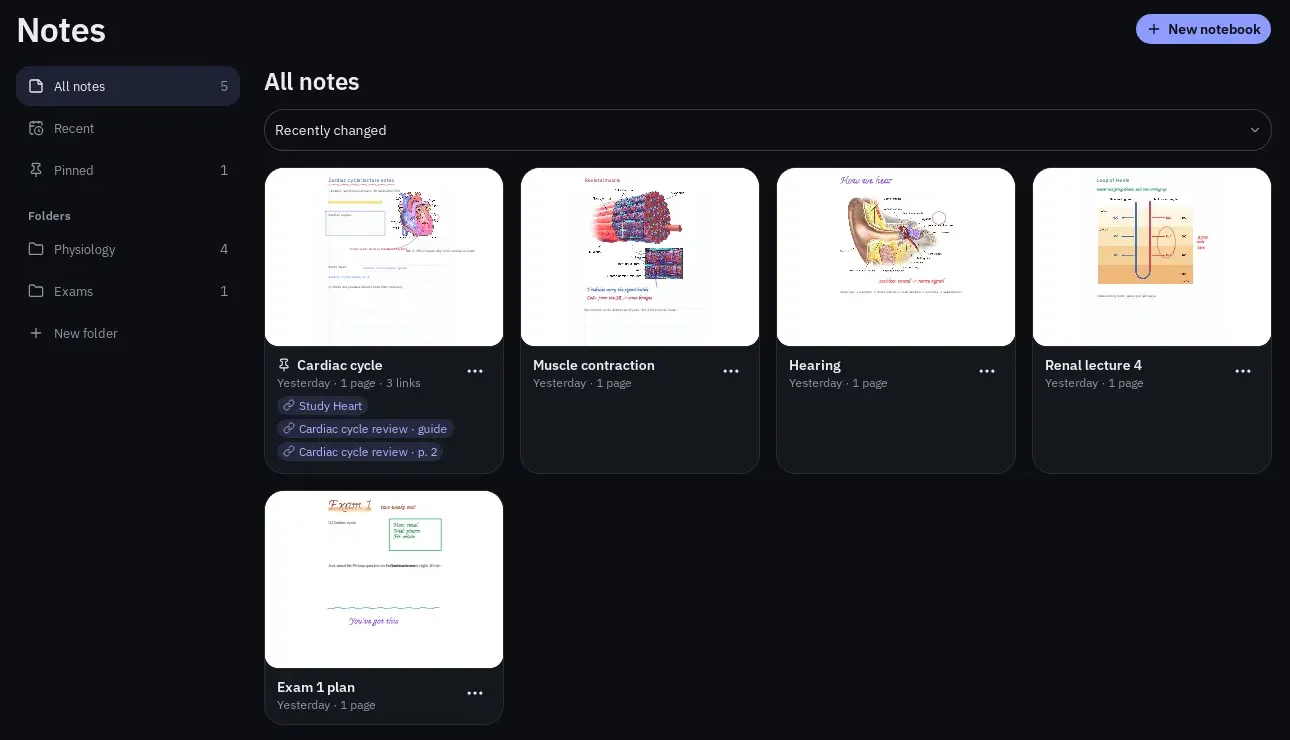
Notes on a computer: All notes, Recent, Pinned and the folders Physiology and Exams beside five notebook tiles: cardiac cycle notes with a heart diagram, muscle contraction with a drawing of a muscle fibre, hearing with a drawing of the ear, a loop of Henle diagram clipped from a lecture, and a handwritten exam plan
Your notebooks as tiles, with their links, in your own folders beside Recent and Pinned. Muscle and ear drawings by BruceBlaus, Wikimedia Commons, CC BY 3.0.

Around your notes

Read, write and keep it all together

A document beside your notes

On a wide screen, open a PDF next to the notebook and mark up both at once.

Pictures

Add PNG, JPEG, GIF or WebP images, or clip a figure straight from a PDF page.

Folders and pins

Arrange notebooks in folders of your own, pin the ones you use most, and find them under Recent.

Save as a PDF

Export a notebook as an ordinary PDF anyone can open, with your marks drawn as you see them.

Filed by subject

Each notebook can belong to a subject, alongside that course's documents, guides and decks.

Backed up and synced

Notebooks are in every library backup, and device sync carries them, pictures included, between your own devices.

Keep exploring